Description
[cmsms_row data_width=”boxed” data_padding_left=”3″ data_padding_right=”3″ data_color=”default” data_bg_color=”#ffffff” data_bg_position=”top center” data_bg_repeat=”no-repeat” data_bg_attachment=”scroll” data_bg_size=”cover” data_bg_parallax_ratio=”0.5″ data_color_overlay=”#000000″ data_overlay_opacity=”50″ data_padding_top=”0″ data_padding_bottom=”50″][cmsms_column data_width=”1/1″][cmsms_heading type=”h1″ font_weight=”400″ font_style=”normal” text_align=”default” target=”self” margin_top=”0″ margin_bottom=”20″ animation_delay=”0″]Mi|Home Control Adapter (Starter Pack)[/cmsms_heading][cmsms_text animation_delay=”0″]
Do I need the Mi|Home Gateway?
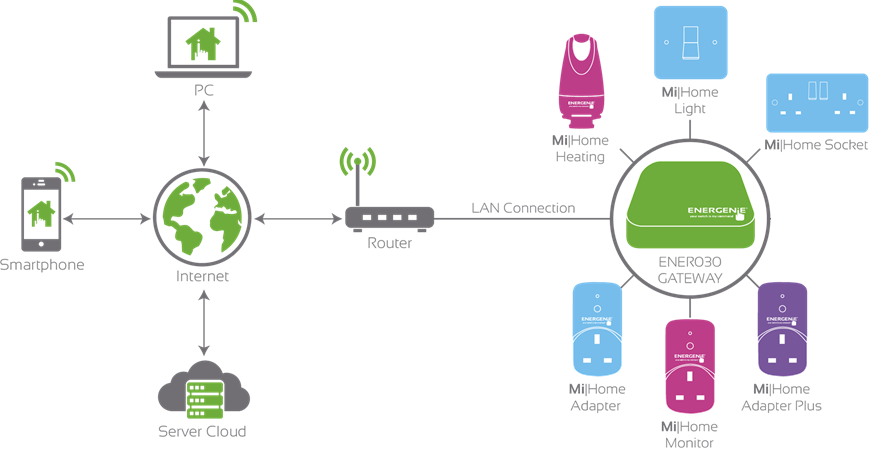
The Gateway is central to the Mi|Home system and provides the communications between all your Mi|Home devices and the internet. It lets you control everything from your heating through to your lighting and appliances from anywhere in the world using the MiHome app. The Gateway opens up a world of features to you.
How to set up the Mi|Home Gateway:
Connect your Gateway hub to your home router using the Ethernet cable provided. You will then need to plug the PSU into your wall socket. Once this has been plugged in, attach the USB cable into the Gateway and PSU. Your Gateway should now be connected (confirmed by a illuminating green light on the front of the unit)

How to configure the Mi|Home Gateway using a Smartphone:
1. Find and install the MIHome Application from either the iOS Store or Android Play Store.
2. Follow the quick and simple on-screen instructions
How to pair Mi|Home Control Adapters using a Smart Phone:
1. Open the already installed MiHome application
2. Proceed to the Dashboard and go to ‘Add New Device’
3. Select the appropiate Adapter icon (in this case, it will be the Blue Adapter)
4. Plug your adapter to a mains powered socket and follow the instructions on the application.
[/cmsms_text][/cmsms_column][/cmsms_row]